
Tools

AI資料作成
AIプレゼンテーション
BEST
AI文章作成·作文
AI ポスター
AIかんたん作成
AI画像生成
AI動画生成
HOT
AI キャラメーカー
AI アイコン作成ツール
AI アイコンメーカー
AIイラスト生成
AI ロゴメーカー
AI フリー背景素材
AIクイック編集
AI画像編集
背景除去
高画質化
写真イラスト化
HOT
New!

イラスト一覧を見る
幅広いシーンで使える高品質イラストをご用意しています。
Plans


Explore Black Friday flyer ideas for bold discounts, weekend sales, online offers, and more, with editable templates and practical design tips.
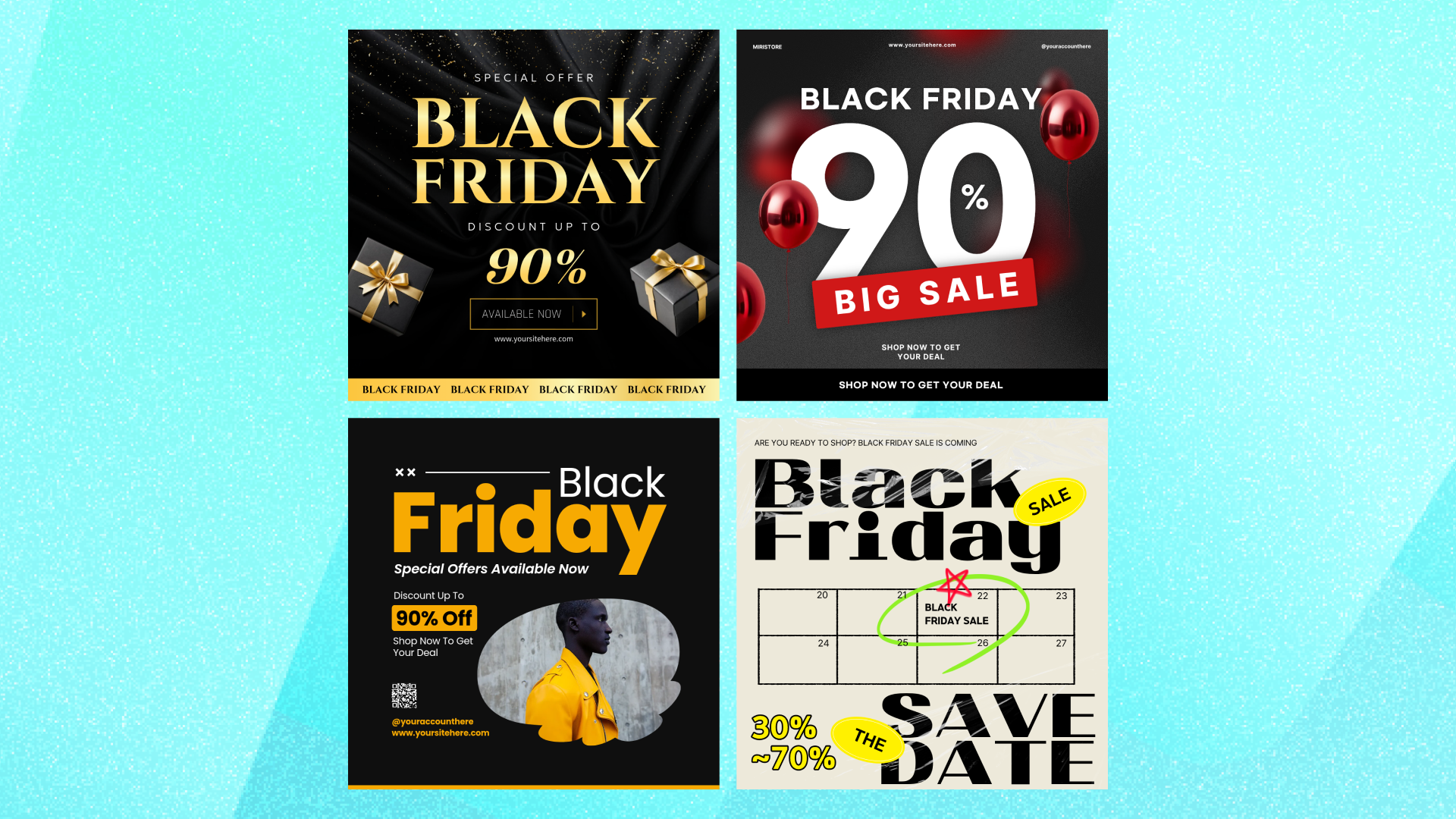
A Black Friday flyer needs to answer a few questions quickly: What is the deal? When does it end? And what should shoppers do next?
How you answer them depends on the sale. A storewide discount can lead with one oversized number. A product sale may need more room for photography. An online promotion can give shoppers a QR code, while a weekend sale needs the dates to stand out.
The ideas below show different ways to build a Black Friday promotion around the offer you are actually running. Some of the featured templates are square digital designs, while others use poster-style layouts. Use them as starting points for your Black Friday campaign, then choose the format that fits where your promotion will appear.
Looking for the full creation process? Follow how to make a Black Friday flyer for a step-by-step example.
Before choosing a design, decide what the flyer actually needs to communicate.
Your primary offer. Give the strongest promotion the most visual weight. That might be “40% off,” “Up to 60% off,” or “Buy one, get one free.” If you have several deals, choose one to lead with or organize them so shoppers can tell which offer matters first.
The sale dates. Black Friday falls on Friday, November 27, in 2026. If your promotion begins earlier or continues through the weekend, show the complete date range.
Important conditions. If the discount applies only to selected products, excludes certain categories, requires a minimum purchase, or is available only in store, include that information clearly.
One next step. Tell shoppers what to do after seeing the flyer. Depending on the sale, that might be “Shop in store,” “Shop online,” “Scan to shop,” or “Use code BLACKFRIDAY.”
Your business information. Include the business name and the most useful way to find you. For a local store, that may be the address and opening hours. For an online promotion, it may be a web address or QR code.
Once those details are clear, it is much easier to choose a design that fits the promotion.
If your Black Friday promotion has one strong offer, let the discount do most of the visual work.
This design makes the percentage the largest element on the page, with “Black Friday” immediately above it. That makes it a useful starting point for a straightforward sale where the size of the discount is the main reason to pay attention.
Keep the supporting copy short so the offer stays dominant. Add the real sale dates and move any conditions into smaller text below.

What to include: Primary discount, sale dates, business name, and one call to action.
Black Friday does not have to rely on oversized red type to feel promotional.
A dark background with gold details creates a more polished direction while still keeping the Black Friday message and discount prominent. This approach can work well for a boutique, beauty brand, jewelry store, or another business that wants the promotion to stay closer to its usual visual identity.
Keep the palette restrained and let the offer, typography, and a few decorative details carry the design.

What to include: Sale name, primary offer, date range, business name, and a short call to action.
Black Friday tells shoppers when the sale is happening. Your entire design does not have to rely on black and red to communicate it.
A photography-led layout can give the promotion a different feel while keeping the sale message easy to recognize. This example uses a fashion image as a major part of the composition instead of filling the design with sale graphics.
That makes the approach especially useful when the products or brand aesthetic deserve as much attention as the discount itself.

What to include: Black Friday headline, primary offer, dates, and imagery that fits your brand.
If the promotion leads to an online store, give shoppers a clear way to get there.
A QR code can connect a Black Friday promotion with a product page, sale collection, or online storefront when the design appears somewhere people can easily scan it. In this template, the QR code has its own defined area rather than competing with the main Black Friday message.
Keep the discount or offer as the first thing shoppers notice, then place the QR code with a short instruction such as “Scan to shop.”

What to include: Primary offer, sale dates, QR code, short CTA, and business name.
Some Black Friday promotions genuinely need room for more than one offer.
If several products or categories are part of the sale, separate them visually instead of squeezing every deal into one headline. This poster-style layout gives individual items their own space while keeping the overall sale message above them.
Use the strongest offer as the entry point, then let shoppers move through the supporting deals in a clear order.

What to include: Main Black Friday headline, featured products or categories, individual offers, overall dates, and relevant conditions.
Sometimes what you are selling deserves as much attention as the discount.
A product-led design uses photography to show shoppers what the promotion is actually about. Instead of filling the whole layout with percentages and sale badges, this approach lets the image carry part of the message.
It can work especially well for fashion, beauty, accessories, electronics, or another promotion built around a specific product or collection.

What to include: Featured product or collection, primary offer, sale dates, brand name, and shopping CTA.
Black Friday falls on November 27 in 2026, but your promotion does not have to last only one day.
If the sale starts early, continues through the weekend, or runs through Cyber Monday on November 30, make the dates part of the main message. A calendar-led layout like this one gives the timing more visual weight instead of leaving it in small text at the bottom.
This is particularly useful for multi-day promotions where shoppers need to know they still have time to take part.

What to include: Primary offer, complete start and end dates, business name, and one call to action.
Your printed and digital promotions can belong to the same campaign without using exactly the same layout.
For a social post, simplify the message so the main offer still reads clearly at a smaller size. Keep recognizable elements such as the Black Friday headline, colors, typography, or product imagery, but reconsider the hierarchy for the square format.
This template is built around a compact Black Friday message that can work as the digital counterpart to a broader sale campaign.

What to include: Main offer, sale dates, short call to action, and business name.
Make the offer the focal point.
Decide what shoppers should notice first. Usually that is the discount or promotional value. Give it enough size and contrast to stand apart from the supporting information.
Make the dates easy to find.
A strong offer is less useful when shoppers cannot tell whether it is still available. Give the date or date range a clear place instead of burying it in fine print.
Use contrast, not just dark colors.
Black is common in Black Friday designs, but readability comes from contrast. Light type on a dark background, dark type on a light background, or one bright accent can all work. Choose the combination that keeps the important information easy to read.
Keep conditions visible.
“Selected items only,” “In store only,” or another important condition can sit below the main offer in smaller type. It does not need to dominate the design, but shoppers should be able to find it.
Do not fill every empty space.
More sale badges, products, borders, and decorative elements do not automatically make a promotion more noticeable. Leave enough space for the headline, offer, dates, and call to action to remain distinct.
Check the final format.
A flyer displayed in a store, a printed handout, and a square social post are viewed at different sizes and distances. Check the version people will actually see and adjust the text size, spacing, and amount of information when needed.
Found a Black Friday design that fits your sale? Open the template in MiriCanvas and replace the sample content with your actual promotion.
Start with the main discount or offer, then update the dates, business name, and call to action. Add any conditions shoppers need to know and remove sample sections you are not using.
Then adjust the colors, fonts, images, and other editable parts of the template to better fit your brand.
If you need the campaign in another format, keep the offer and visual direction consistent but adapt the layout for its new placement instead of simply stretching the original design.
For the complete process, follow how to make a Black Friday flyer.
You can also browse more Black Friday templates in MiriCanvas to find a design that fits your sale.
Start with the main offer and sale dates. Then add any important conditions, one call to action, and your business name.
For a local store, you may also need the address and special opening hours. For an online sale, add a web address or QR code when appropriate.
Choose the size based on where the design will appear.
US Letter, 8.5 × 11 inches, is a practical option for standard handouts and office printing. A flyer or poster displayed in a store window may need a larger format.
For social media, email, or website placements, create a version that fits that specific placement rather than assuming the printed layout will work unchanged.
MiriCanvas offers both free and premium Black Friday templates. You can browse the available options and choose a template that fits your sale and account.
Once you find one you like, open the template to check its availability before you start customizing.
Yes, if the design is set up for the size and printing method you plan to use.
For commercial printing, confirm the required dimensions, file format, bleed, and margin requirements with the printer. For home or office printing, preview the exported design at the paper size you plan to use.
You can carry over the same offer, colors, images, and overall campaign style, but the layout may need to change.
A printed flyer and a square social post have different proportions and are viewed at different sizes. Adapt each version for its placement and check that the offer and dates remain easy to read.
Black Friday falls on Friday, November 27, 2026. Cyber Monday follows on Monday, November 30.
If your promotion starts earlier or runs across the weekend, put the actual start and end dates on the flyer.
The timing depends on your business, offer, and marketing channels.
Printed flyers need enough lead time for production and placement. Email, social media, and website promotions can be updated closer to the sale. Work backward from your promotion date and allow time for design review, printing, scheduling, and any other preparation your campaign requires.
Choose a Black Friday template, add your offer and dates, and customize the design for your business.
Browse templates


